Software
Introducing KMotion, KMotionCNC, and our Feature-rich Libraries
Dynomotion's current software package comprises three major components:
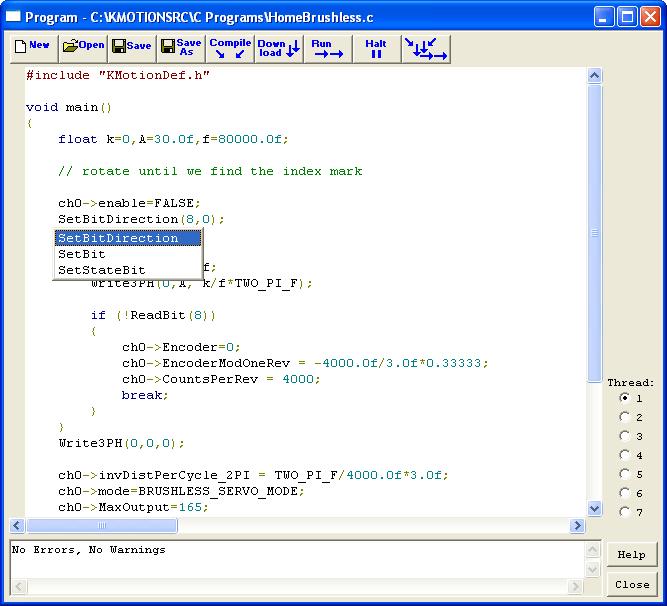
- KMotion.exe (pronounced 'commotion'), which is used to configure settings in KFLOP, initialize axes, and to write C programs to control your system.
- KMotionCNC, which is our CNC application that has a GUI (Graphical User Interface) and is used to control systems based on G-Code. Alternatively, we have a Mach3 plugin so our boards can be used with the Mach3 CNC application.
- The KMotion libraries that form the heart of the other two software components as well as user-created or third-party applications.

KMotion Software Libraries Background
Dynomotion's KMotion software libraries contains the following components:
- A Dynomotion-developed Trajectory Planner
- A Dynomotion-developed Coordinated Motion Library
- A G-Code interpreter
- Kinematics Layer with Geo-Correction
- .NET interface
The KMotion libraries are powerful in that they do all of the difficult computational and coordinated tasks for the user. You can create your own software to make use of the libraries directly, or through the .NET framework, or use third-party software that already makes use of the .NET framework such as National Instruments' LabVIEW.
KMotion.exe Background
KMotion.exe (or KMotion - pronounced like 'commotion') is the main program that is used to configure settings in KFLOP, initialize axes, and to write C programs to configure and setup KFLOP to control your system.
KMotionCNC Background
KMotionCNC is our CNC program used as a graphical user interface to your KFLOP-enabled machine tool. KMotionCNC has all of the basic functionality you need to run a machine of up to 6 axes, in addition to spindle control: jog buttons, tool setup features such as tool width compensation for up to 20 tools, pre-loaded tool types, trajectory planner parameter adjustments, user-defined M-Codes, G-Code capabilities, and a G-Code viewer. In addition, you can use geo-correction routines to drastically improve the accuracy of your system.
KMotionCNC depends on some simple setup and initialization of your system that can be completed one time in KMotion.exe and then called from KMotionCNC thereafter.
Other Options - Mach3 Plugin
Besides writing your own software or using .NET compatible third-party software to tie into our libraries, you have the option to use a popular CNC application called Mach3 much as you would KMotionCNC.
Significant Flexibility
Throughout our product line our goal is to provide extreme flexibility and this is reflected in our software. At every turn, in every choice we had to make, we chose to provide the user with the option that allowed for more flexibility. After spending the time to learn how to use them you will understand just how powerful are our boards and software. So with a little up front investment, you can have years of tailored motion control.
Free Download
Our latest software is available for free at the link below.
Download Here - http://dynomotion.com/Software/Download.html
KMotion Software Breakdown:
| Parameter | Specification |
|---|---|
| User Programs | |
| Language | C |
| Number concurrent | 7 |
| Stand alone mode | Yes |
| Host Requirements | |
| OS | MS Windows™ 2000, MS Windows™ XP |
| Interface | USB 2.0 |
| Interface Library | |
| Multi-Thread | Yes |
| Multi-Process | Yes |
| Multi-Board | Yes |
| MS Windows™ VC++ | Supported |
| MS Windows™ VB | Supported |
| MS Windows™ C# | Supported |
| MS Windows™ .NET | Supported |
| C Compiler | |
| TCC67 | Included |
| G Code | |
| Interpreter | Included |
| Script Language | |
| ASCII Commands | Included |
| Trajectory Planner | |
| Coordinated Motion | 6 Axis |
| Executive Application | |
| Configuration | Upload/Download/Save/Load Motor Config |
| Tuning | Move/Step Response, Bode Plot, Calc Filters |
| User Programs | Integrated IDE - Edit/Compile/Download/Exec |
| G Code | Integrated |
| Command Console | ASCII Command Entry - Log Console |
| Status Display | Axis/Analog/Digital |
Please view our on-line documentation for full details