Page 1 of 1
Plasma cutter tool offset
Posted: Wed Mar 31, 2021 6:49 am
by cnc_freak
Hello.
In a plasma cutter i try to use G42 in order to compensate the arc diameter. The problem is that when i try to cut rectangle/orthogonal pieces i get the message "Concave corner with cutter radius comp".Is there a way to workarount this issue, because i can't change the cutting part with radius on the corners.
Regards.
Re: Plasma cutter tool offset
Posted: Wed Mar 31, 2021 4:34 pm
by TomKerekes
No, there isn't a way to go around an "inside corner" with a round tool without gouging. You will need to add arcs to the corners.
Re: Plasma cutter tool offset
Posted: Wed Mar 31, 2021 5:22 pm
by cnc_freak
Its an "outside corner" i want to go around. Is there a way to define a square tool?
Re: Plasma cutter tool offset
Posted: Wed Mar 31, 2021 5:29 pm
by TomKerekes
Its an "outside corner"
Then you should not get that error. Maybe your entry move into radius compensation. See
here.
Post the GCode and your Tool Table Settings for the Tool.
What Version are you running?
Is there a way to define a square tool?
No

Re: Plasma cutter tool offset
Posted: Wed Mar 31, 2021 7:43 pm
by cnc_freak
Here are two gcode files. Rename them to *.ngc and the default.txt is the tool file, rename it to *.tbl
I use 435d version.
Regards.
Re: Plasma cutter tool offset
Posted: Wed Mar 31, 2021 11:07 pm
by TomKerekes
I think it depends on where the tool is when you start the Job. You don't have a controlled entry move into radius compensation.
The GCode turns on radius compensation and moves to a starting point of X=672 Y=7 and moves upward.
If the tool begins on the Left of that point it is ok:
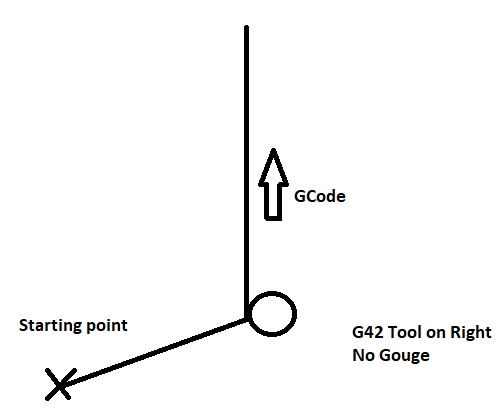
- NoGouge.png (6.73 KiB) Viewed 5642 times
If on the Right there is a gouge
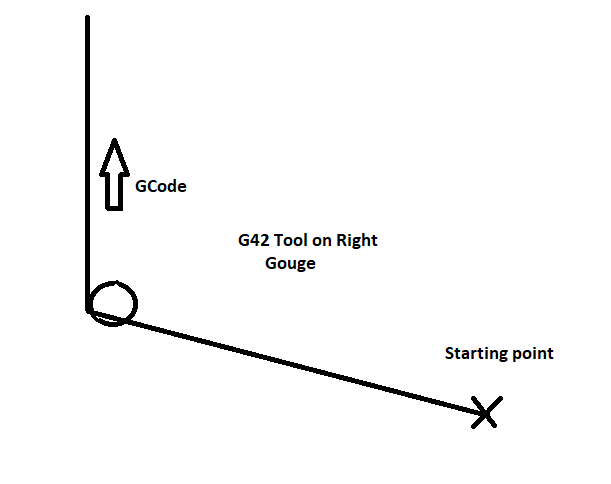
- Gouge.png (6.34 KiB) Viewed 5642 times