Softlimits and scara kinematics

Moderators: TomKerekes, dynomotion

Ibzan
Posts: 16
Joined: Thu Sep 22, 2022 9:03 pm

Re: Softlimits and scara kinematics

Post by Ibzan » Thu Sep 29, 2022 9:52 pm

:D
TomKerekes wrote:
Thu Sep 29, 2022 6:28 pm
Visual Studio has various build configurations. Basically Debug and Release. Debug is less optimized and easier to Debug. Release is more optimized but difficult to debug. Debug code is placed in the \KMotion\Debug folder. Release code is placed in the \KMotion\Release folder.

Your desktop icon probably points to the Release folder. If so rebuild in the Release Configuration to recompile the Release code.
Thank you very much, I was able to load it correctly and everything seems to work fine, let's see if in a few days I'll clean up the equations and upload a video of how it works.

Greetings and thanks for the help. :D :geek:

User avatar
TomKerekes
Posts: 2891
Joined: Mon Dec 04, 2017 1:49 am

Re: Softlimits and scara kinematics

Post by TomKerekes » Thu Sep 29, 2022 11:22 pm

Great. Can't wait for the video. Please tag Dynomotion.
Regards,

Tom Kerekes
Dynomotion, Inc.

Ibzan
Posts: 16
Joined: Thu Sep 22, 2022 9:03 pm

Re: Softlimits and scara kinematics

Post by Ibzan » Sun Oct 16, 2022 10:15 pm

TomKerekes wrote:
Thu Sep 29, 2022 11:22 pm
Great. Can't wait for the video. Please tag Dynomotion.
I share these videos of the Planar Robot operation. (It is for testing purposes) I am working to implement it in a more professional way.

[Youtube]https://www.youtube.com/watch?v=F0LN8sB59fc[/youtube]
[youtube]https://www.youtube.com/watch?v=AFPeN_TAvDY[/Youtube]
TomKerekes wrote:
Thu Sep 29, 2022 11:22 pm
What do you mean by Planar Robot? Scara? It seems that has different Kinematics.
I used the kinematics of the Robot Scara as a reference (leave the same name of the scara but the kinematics is different).
TomKerekes wrote:
Thu Sep 29, 2022 11:22 pm
If the path is distorted then some parameter must be wrong (assuming the actuators have small errors).

Have you checked things like the actuators degrees per count?

Have you checked that you are not loosing counts or steps? Check for drift after may back and forth motions.

Otherwise start with simple motions. ie +/- 2inches in X. +/-2 inches in Y. Are distances correct? Are the motions orthogonal?
I will review all these aspects in detail.
TomKerekes wrote:
Thu Sep 29, 2022 11:22 pm
Yes you can use your own Control method. The Control must be performed in real-time in KFLOP (Kinematics are not real time and performed in the PC). Configure the KFLOP axis as No Output and write a User C Program to do your algorithm and write the output based on the Axis's desired Destination.
If I understand correctly, what you are saying is:
1) Write my C program for my new control method to use.
2) Set the Kflop No Output
2) Load my C program with INIT so that it is always running? Taking into account the values ​​of the measurements of the encoders to use them in the control.
Are the steps I indicated correct?
Attachments
imagen_2022-10-16_170442673.png
INIT
images.png
planar Robot
images.png (4.17 KiB) Viewed 7802 times

User avatar
TomKerekes
Posts: 2891
Joined: Mon Dec 04, 2017 1:49 am

Re: Softlimits and scara kinematics

Post by TomKerekes » Sun Oct 16, 2022 10:22 pm

If I understand correctly, what you are saying is:
1) Write my C program for my new control method to use.
2) Set the Kflop No Output
2) Load my C program with INIT so that it is always running? Taking into account the values ​​of the measurements of the encoders to use them in the control.
Are the steps I indicated correct?
Yes merge your algorithm into the Init program at the end in a forever loop.
Regards,

Tom Kerekes
Dynomotion, Inc.

danabradbury
Posts: 8
Joined: Sat Nov 29, 2025 8:50 pm

Re: Softlimits and scara kinematics

Post by danabradbury » Sun Nov 30, 2025 9:56 pm

I'm following this series of posts to setup a scara robot arm. I think I'm close but missing a couple things.

I have copied the provided scara kinematics file and made one change to the arm lengths. But I am missing where I set values for pulses per degree?
Maybe these come from setting up KmotionCNC? I think I could set the values directly in my kinematics file, but I think I'm missing something as the example file reads them in?

scaraScreenShot2.JPG
scaraScreenShot1.JPG

User avatar
TomKerekes
Posts: 2891
Joined: Mon Dec 04, 2017 1:49 am

Re: Softlimits and scara kinematics

Post by TomKerekes » Sun Nov 30, 2025 10:16 pm

Hi Dana,

Yes if you’re using KMotionCNC those can be set in the Tool Setup | Trajectory Planner Screen. Note even though the variable is called CountsPerInch it is actually counts per degree for an angular axis.

Not sure what you mean by the example file reads them in.
Regards,

Tom Kerekes
Dynomotion, Inc.

danabradbury
Posts: 8
Joined: Sat Nov 29, 2025 8:50 pm

Re: Softlimits and scara kinematics

Post by danabradbury » Thu Dec 04, 2025 4:07 pm

Thanks Tom,

Setting the values in the trajectory planner worked. I can now make some xyz motion from KmotionCNC and the results seem reasonable. The image isn't much, but it shows a sharpie drawing straight lines just by jogging x and y and changing the height by jogging z.
PXL_20251204_002305304.jpg
But I'm still missing something, some jogs cause an oscillation that I can't quite explain. The youtube video shows the pen moving in x back towards base, then in y+. Shortly after it starts moving in y it starts to oscillate while I'm still holding the y jog button. When the arms are father out, so a smaller angle between the arms, the y direction works fine.

One thing I'm a little confused about is homing, or more like starting from a known position. I have have done nothing really to tell the machine where is 0,0 or how that translates to angles. And this seems wrong, like I have really skipped a step?

The individual motion of each axis seems very smooth and predictable, for example when I use the console to send move commands, or via c code. Maybe I'm hitting angles where the kinematics are not calculating right? Frankly I'm a little lost, I guess I'm looking for general guidance on what my next trouble shooting step should be?

Thanks
Dana
[youtube]https://www.youtube.com/watch?v=Zl-Qn7YpgXY[/youtube]

User avatar
TomKerekes
Posts: 2891
Joined: Mon Dec 04, 2017 1:49 am

Re: Softlimits and scara kinematics

Post by TomKerekes » Thu Dec 04, 2025 11:46 pm

Hi Dana,

Jogging with non-linear kinematics is actually somewhat more complex than coordinated motion because it can start/stop/change direction unpredictably unlike coordinated motion that can be pre-planned. Let's get the homing sorted out and see how it moves.

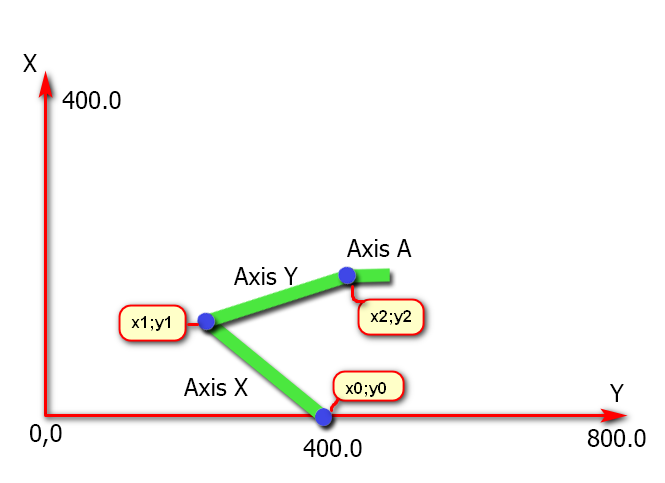
I think the axes should homed in a way such that the primary axis should point in the X direction when at 0 and the second axis in line with the primary axis when at 0 like the diagram below as described in the posts above. But you haven't described your geometry to us.

brazo3.png
brazo3.png (58.75 KiB) Viewed 4878 times

Does the system operate properly when running GCode or using the Jog 'Step' Buttons (which perform pre-planned coordinated motion)?
Regards,

Tom Kerekes
Dynomotion, Inc.

danabradbury
Posts: 8
Joined: Sat Nov 29, 2025 8:50 pm

Re: Softlimits and scara kinematics

Post by danabradbury » Sat Dec 06, 2025 10:53 pm

Hi Tom,

Sorry for not describing the geometry better. It is a yamaha scara robot. I have attached more details but It essentially the same as in your diagram. Both arms are the same length, 23.63 in.
PXL_20251206_223200552~2.jpg
PXL_20251206_223144943~2.jpg
PXL_20251206_215433145.jpg
After reading your reply I first moved the arms inline and along something close to an x axis. Then I set the postion of the end (47,0). I tried a simple gcode move, which went in a completely different direction than I expected. It also went way too fast to be safe. So the next thing I did was slow the max velocities and accelerations down in the step response window, and then updated my init file.

Next I tried the jog step. I started with z (channel5) which is just the vertical position of the end effector. It seems spot on.
Then I tried x and y jog steps at .01 inch. The motion is very inconsistent, sometime it really jerks hard other times it is slow and smooth, sometimes it looks like it is generally going in the right direction other times, not so much.

One thing I realized is my shoulder joint is turning the reverse from what I think should be the positive direction, for coordinates as drawn. So for example, a moveRel7=5000 from the console moves in what would be the clockwise direction, looking down on the robot, or towards the x axis. I think I just need to flip the direction in the channel setup? I'm guessing it is straight forward, but I'm missing it. I did try setting the count/deg in the trajectory planner to negative but I don't think that was right. And, oddly, now that I changed x and y ( I mistakenly changed y) I can't seem to set them back? I tried removing the minus, but they seem to persist after choosing "OK" and also after a restart.
trajectoryPanner.JPG
On top of all this, I did not do anything with the "jerk" in the step response screen, I left the default. Not sure important this for what is, if I' sayin git right, effectively an open loop system, form Kmotion's perspective?

Thanks for the help,

Dana

PS I'm also attaching my kinematics file and my init file
scaraMechanicalLimits.JPG
Attachments
InitDanasScara.c
(5.37 KiB) Downloaded 86 times
KinematicsDanasScara.h
(1.38 KiB) Downloaded 109 times
KinematicsDanasScara.cpp
(4.5 KiB) Downloaded 91 times
yk1200x.pdf
(268.23 KiB) Downloaded 122 times
scaraMechanicalLimits.JPG

danabradbury
Posts: 8
Joined: Sat Nov 29, 2025 8:50 pm

Re: Softlimits and scara kinematics

Post by danabradbury » Sat Dec 06, 2025 11:08 pm

Tom, I was going to clarify that I was mostly blindly using the scara kinematics files included (KMotion5.4.1\GCodeInterpreter\KinematicsScara.cpp) with kmotion, with the one change of making the arm lengths match my machine. I opened it to take a closer look, and now I think I am maybe treating 0,0 wrong. I think this line offsets the machine base to right (x pos) of 0,0 by the length of the arms.

So more like the image here - https://www.dynomotion.com/wiki/index.p ... s#Overview

Image

And not like my drawing

I still think I have something wrong with my shoulder joint rotation direction, and maybe someting off with acceleration and jerk? But let me also try to remove the offset from the kinematics file, to move the machine base back to 0,0

Thanks again, sorry for the confusion,

Dana
PXL_20251206_215433145.jpg

Post Reply